

Tunisia Offline Map and Travel Guide
Places picked by a local tourism expert, on a map of Tunisia that works without internet.
No subscription. One payment of $3.99.

Coming soon to the App Store
Map Out Your Way Around Tunisia
Exploring is easier when you can see what’s nearby. The app’s offline map of Tunisia:
- Shows your current GPS position, your hotel, and tourist attractions around you.
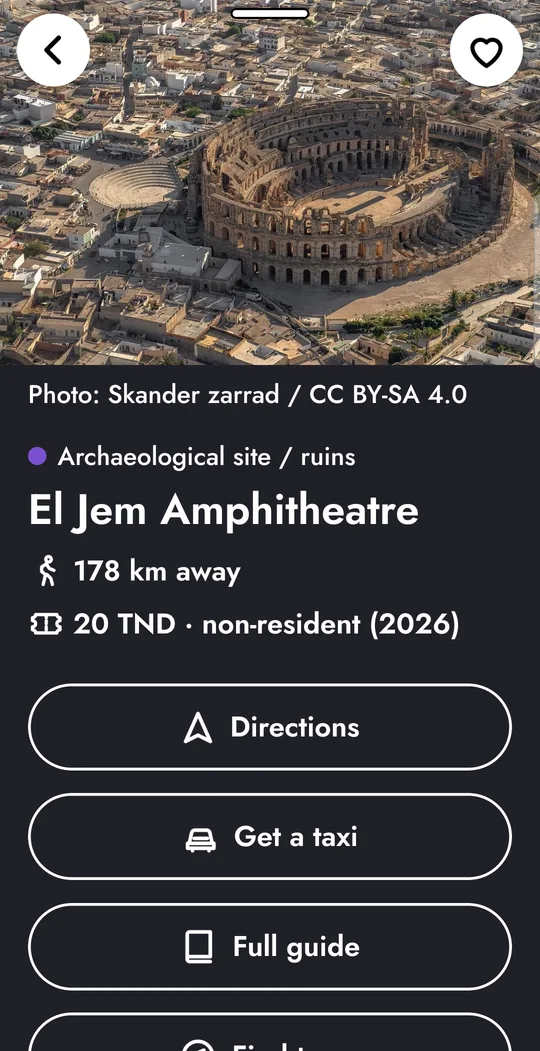
- Lets you tap any place to find out what it is and how far away it is.
- Gives distance updates as you walk, making it easier to decide what to visit next or whether to change your route.
Find Tourist Attractions Selected by a Local Expert
Tunisia has too much to choose from. From Roman ruins and museums to beaches, markets and small local restaurants, the map brings together places selected by a Tunisian tourism expert, covering destinations across the country.
Browse everything or narrow the results to favorite categories. Looking for somewhere to eat, a beach to spend the afternoon, or a historical site? Just choose what you want to see on the map.
Opening Hours, Prices and Local Tips
Before setting off to visit somewhere, know a little about what to expect. Each place listing includes nitty gritty information like opening hours, prices, directions and a local tip.
Once you’ve chosen where to go, get directions or arrange a taxi with a tap.
Roam Tunisia Without Roaming Charges
Not everyone wants to use mobile data while travelling. Roaming charges can be expensive, and a local data connection isn’t always convenient.
The Tunisia map, GPS, place information, and search function are available without internet access. Look for attractions, check distances and explore different areas without using mobile data or paying roaming charges. Just download the app before you leave home.
Search for Places. Even If You Don’t Know Their Names
Remember the Roman amphitheatre at El Jem but can’t recall its exact name? Looking for a traditional Turkish bath but don’t know what to search for?
The app understands everyday search terms, including alternative spellings and descriptions in English or French.
Visiting Sousse, Hammamet or Djerba?
If you’re staying in an area, focus on local attractions and activities rather than searching the whole country. Open the chosen area to browse places by category, or search within it for nearby beaches, restaurants, hammams, and other places to visit or things to do.
Your Hotel is Your Base Point on the Map
Set your hotel as a starting point and it stays visible on the map, making it convenient to check how far each attraction or place of interest is from where you’re staying. Is something close enough for a walk? You’ll see the distance at a glance.
Save Places You’d Like to Visit
Found somewhere interesting? Tap the heart to add it to your favorites, even the maybes. Saved places appear on the map automatically as well as in a separate list, sorted by distance from your hotel. It means you can browse places at home, heart the ones that interest you, then find them again when you get to Tunisia.
Easy to Read, Day or Night
Maps and small text can be difficult to read, especially on a phone. This app uses large, high-contrast text, with street names becoming larger as you zoom in, and a magnifier that makes smaller details easier to see. Or switch between light and dark display settings on every screen.
Designed for Tablets Too
The Tunisia travel guide also works on tablets. Hold your device sideways to display the map and guide next to each other, search for a place, read its full description, and see its location without navigating different screens.
Browse on a Bigger Screen
View places in your chosen area as photo cards, with a search function to help you find particular attractions and activities.
Use Dark Mode
Switch the whole app to dark mode, including the map and guide.
Adjust the Map and Guide
Slide the dividing edge to give the map or the information panel more space, depending on what you’re looking at.
Browse Categories with Big Buttons
Turn different place categories on or off in one tap to focus on only the attractions you want to see.
Pay Once
The Tunisia travel app costs $3.99, paid once. There are no advertisements, subscriptions or account requirements. You get access to the entire country, and new places added to the guide are free.
$3.99
Coming soon to the App Store
Frequently Asked Questions
Does the Tunisia offline map work without internet?
Yes. The map, GPS, place listings, search and saved favorites work without an internet connection, but you do need internet access to call a taxi, open an external website or download the newest places.
How big is the download?
It takes up about 260 MB, so we recommend downloading it over Wi-Fi before your trip.
Do I need to create an account?
No account, no registration, no login. Details are saved directly on the device’s storage.
Are there advertisements or subscriptions?
No. You pay $3.99 once, with no recurring charges.
Does the app track my location?
No. Your location stays on your phone and is never sent to us. See our privacy policy for more information.
What types of places can I find?
The guide includes areas and places, with their tourist attractions, museums, Roman sites, beaches, natural attractions, restaurants, cafés, hammams, tours, activities, markets, shops, hotels, and more.
Which parts of Tunisia does the map cover?
The Tunisia tourist map covers the whole country, divided into eight areas:
- Grand Tunis
- Tabarka & North
- Hammamet & Cap Bon
- Sousse & The Sahel
- Kairouan & Sbeitla
- Djerba
- Tataouine & Matmata
- Tozeur & Douz
Can I use the guide before travelling?
Yes. You can browse tourist attractions, check out destinations, and save favorite places before leaving home. They’ll still be marked on the map when you get to Tunisia, even without an internet connection.
Does it work on tablets?
Yes. Turn the tablet sideways to view the map and guide side by side, or browse places as photo cards, adjusting the space available to each panel.
How can I contact you?
Use the contact form on our website or email [email protected].
Get the Tunisia Guide App
Planning a trip or simply want to explore? Download the app before you travel and tap your way through the whole country.
Coming soon to the App Store
Scan the QR code to get the app.